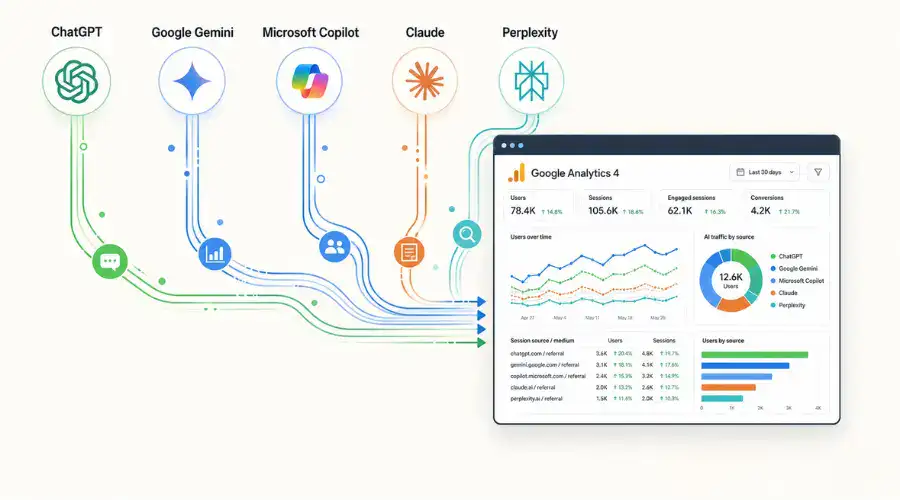
Google Gemini now automatically appends UTM parameters to referral links in AI Mode responses. This enables proper attribution of AI-driven traffic in Google Analytics 4, transforming previously invisible “dark traffic” into trackable, measurable referrals. Here’s how to set up tracking and measure AI referral performance.
Why Gemini UTM parameters matter
Before UTM parameters, when Google Gemini or AI Mode referenced a website and included a link, traffic often appeared as “direct” or unattributed in analytics. Publishers had no way to measure how much traffic AI systems were sending them.
Google’s implementation of UTM parameters solves this gap. Links from Gemini now include parameters such as utm_source=gemini, utm_medium=referral, and utm_campaign=ai_mode. Analytics platforms properly recognize and segment this traffic.
For publishers, this creates visibility into: which pages receive AI citations and referrals, conversion rates from AI users vs. organic search users, revenue contribution from AI sources, and trends in AI citation volume over time.
Understanding Gemini UTM structure
Referral URLs from Gemini follow a predictable pattern:
example.com/page?utm_source=gemini&utm_medium=referral&utm_campaign=ai_mode
Breaking this down:
- utm_source=gemini: Identifies Google Gemini as the traffic source
- utm_medium=referral: Classifies this as referral traffic (similar to how links from other websites are tracked)
- utm_campaign=ai_mode: Specifies that traffic came from AI Mode specifically
In Google Analytics 4, these parameters populate the Acquisition report’s source/medium dimension. “Gemini / referral” appears as a distinct traffic segment alongside “google / organic,” “facebook / cpc,” and other channels.
Setting up GA4 to track Gemini referrals
Step 1: Verify GA4 measurement is installed
Ensure your GA4 measurement ID (format: G-XXXXXXXXXX) is correctly installed on all pages. Go to Admin → Data Streams and confirm your web stream is active. GA4 automatically captures UTM parameters without additional configuration.
Step 2: Access acquisition reports
In GA4, navigate to Reports → Acquisition → Traffic acquisition. This default report shows all traffic sources including utm_source and utm_medium dimensions.
Step 3: Filter for Gemini traffic
In the Traffic acquisition report, look for rows with Source = “gemini” and Medium = “referral.” These are Gemini referrals. If you don’t see Gemini traffic, either your site hasn’t received AI citations yet or the traffic hasn’t been recorded (allow 24 hours for data to appear).
Step 4: Create a custom segment for Gemini traffic
Create a custom segment to isolate Gemini traffic for deeper analysis. Go to Admin → Custom Segments and create a new segment with conditions:
- Source = “gemini” AND Medium = “referral”
This segment can be applied to any GA4 report to filter only Gemini traffic.
Creating a custom Gemini reporting dashboard
Dashboard components:
- Sessions from Gemini: Total sessions where utm_source=gemini
- Gemini conversion rate: Conversions / sessions for Gemini traffic (compare to organic search rate)
- Top landing pages from Gemini: Which pages receive the most AI citations
- Gemini traffic trend: Sessions over time to understand if AI citations are increasing or decreasing
- Revenue from Gemini: If e-commerce or affiliate tracking is enabled, isolate revenue from Gemini referrals
- Comparison vs. organic search: Side-by-side metrics comparing Gemini performance to Google organic traffic
To build this dashboard: go to Reports → create a new custom report. Add dimensions (Source, Page Title, Landing Page) and metrics (Sessions, Conversions, Revenue). Apply the Gemini traffic segment.
What AI referral traffic reveals
Content performance in AI systems: Pages receiving high Gemini traffic are being cited frequently in AI responses. These pages likely have strong original research, clear methodology, or authoritative expertise that AI systems recognize and cite.
User intent differences: Gemini users are asking conversational questions seeking curated summaries or comparisons, not keywords. Pages that perform well in Gemini are often educational, how-to, or comparison-oriented content—not product landing pages.
Conversion path patterns: Track whether Gemini users convert differently than organic search users. A betting affiliate might find that Gemini users (seeking comparison information) convert better than organic users searching for specific bonus terms.
Optimization tactics based on Gemini data
Double down on high-performing content: If your casino comparison guide receives 50% of all Gemini referrals, invest in expanding and deepening that content. Add more comparison categories, update information, and build topical authority around comparison content.
Identify optimization gaps: If competitive pages receive Gemini citations but yours don’t, audit your page’s structure, original research, methodology clarity, and author credentials. AI systems cite pages with transparent, verifiable methodology.
Monitor referral quality: Track conversion rates by Gemini landing page. Some pages may receive traffic but not convert. Optimize those pages’ CTA, form fields, or offer positioning to improve conversion rate from AI referrals.
Expected Gemini referral volume
Gemini referral volume depends on your content niche and authority level. Early data shows: established authority sites in news, finance, and tech receive 100+ Gemini sessions per day; mid-sized affiliate and review sites receive 10-50 sessions per day; newer sites receive <10 sessions per day.
Gemini traffic is currently 5-15% of typical organic search traffic volume for the same domain. As AI Mode expands and becomes a primary search entry point, this percentage will grow.
Related Resources
- SEO, GEO, AEO Audits: Website Audit Tool for AI Search
- Shift To GEO (Generative Engine Optimization) & Publisher Compensation Pushback
- Google Spam Update And Image Search Data In Search Console
- Ditch the Bloat: How Modern WordPress Features Can Reclaim Your Site’s Speed and Search Traffic
- First-Party Data & Clean Rooms Replace Deprecated Third-Party Signals
- AI Marketing Trends 2026: Why Fact-Checked Content and AI Search Visibility Matter More Than Ever
- Stop Assembling, Start Building: How Lean Tech Stacks Maximize Core Web Vitals and Paid Ad Returns
- Publisher Friction & AI Web Scraping Monetization
- AI-Native Creative Production Becomes The Baseline
- How I Build An SEO Content Roadmap For The AI Search Era (Step-By-Step)
- What Are Common Structured Data Mistakes That Hurt AI Visibility?
- A Strategic Look at SEO, AEO, and GEO in 2026
Related Resources
Explore marketing news, learn AI content rules, master citation tracking, optimize for AI search, and build your toolkit.
Sources
- Google Analytics Help — UTM parameters and traffic source tracking
- Google Search Central — AI Mode and referral tracking
- Google Analytics Help — Custom segments and audience building
- Google Analytics Help — Custom reporting and dashboards
- Search Engine Journal — Gemini UTM Parameters and AI Attribution